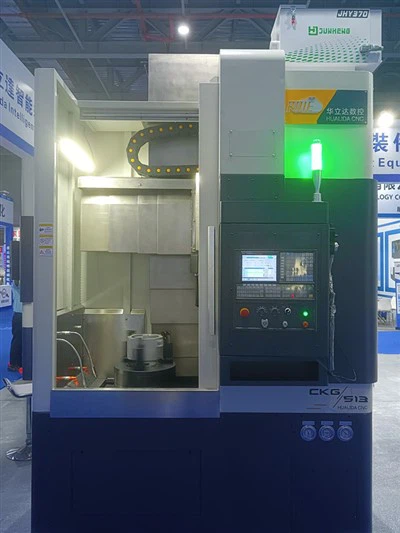
Hey there! As a supplier of the CKG516 CNC Vertical Lathe, I've dealt with all sorts of issues that customers might run into. In this blog, I'll share some tips on how you can troubleshoot common problems with the CKG516 CNC Vertical Lathe.
1. Power - related Issues
One of the first things you might encounter is power problems. If your CKG516 isn't turning on, the first step is to check the power source. Make sure the power cord is properly plugged in, both at the lathe and the electrical outlet. Sometimes, a loose connection can be the culprit.
Also, check the circuit breaker. If it has tripped, reset it. But be careful! If the breaker trips again right away, there might be a short - circuit in the machine. In this case, it's best to call in a professional electrician or our technical support team.
Another thing to look at is the power switch on the lathe itself. Over time, the switch can wear out or get damaged. If you suspect the switch is the problem, you can try gently wiggling it while the power is off to see if there are any loose parts inside. But don't do this if you're not confident, as it can be dangerous.
2. Control Panel Malfunctions
The control panel is the brain of the CKG516 CNC Vertical Lathe. If you're getting error messages or the panel isn't responding correctly, there are a few things you can do.
First, check the display. Sometimes, the issue might be as simple as a loose cable connecting the display to the control unit. Make sure all the cables are securely plugged in.
If the display is blank, it could be a power issue to the display itself. Check the fuse for the control panel. If the fuse is blown, replace it with a new one of the same rating.
For error messages, refer to the user manual. The manual usually has a list of error codes and their possible causes. If you can't find a solution in the manual, note down the error code and contact our support team. They'll be able to help you diagnose and fix the problem.
3. Tooling and Cutting Problems
Poor cutting quality is a common complaint. If you're noticing rough surfaces on the workpiece, there could be several reasons.
First, check the cutting tool. A dull or damaged tool can cause rough cuts. Replace the tool if necessary. Make sure you're using the right type of tool for the material you're cutting. Different materials require different cutting tools.
The cutting speed and feed rate also play a crucial role. If the cutting speed is too high or the feed rate is too low, it can lead to poor cutting quality. Refer to the recommended cutting parameters in the user manual and adjust them accordingly.
Another factor is the tool holder. A loose or misaligned tool holder can cause the tool to vibrate during cutting, resulting in a rough surface. Check the tool holder and make sure it's tightened properly and aligned correctly.


4. Axis Movement Issues
If the axes of the CKG516 aren't moving smoothly or are making strange noises, it's a cause for concern.
First, check the lubrication. The axes need proper lubrication to move smoothly. Make sure the lubrication system is working and that there is enough lubricant in the reservoir. If the lubricant is dirty or low, replace or refill it.
Inspect the ball screws and linear guides. Over time, these components can wear out or get damaged. Look for any signs of wear, such as scratches or uneven surfaces. If you suspect a problem with the ball screws or linear guides, it's best to have them replaced by a professional.
Also, check the servo motors. If the motors are overheating or making abnormal noises, there could be an issue with the motor itself or the drive system. Check the motor connections and the drive settings. If you're not sure how to do this, contact our technical support.
5. Spindle Problems
The spindle is an important part of the CKG516. If it's not running smoothly or is making a lot of noise, here's what you can do.
Check the spindle bearings. Worn - out bearings can cause excessive noise and vibration. If you suspect bearing problems, listen carefully to the spindle while it's running. A grinding or growling noise is often a sign of bearing wear. In this case, the bearings will need to be replaced.
The spindle belt is another component to check. A loose or damaged belt can cause the spindle to run at an incorrect speed or make noise. Make sure the belt is properly tensioned and there are no visible signs of damage.
Also, check the spindle coolant system. The coolant helps keep the spindle cool during operation. If the coolant level is low or the coolant pump isn't working, the spindle can overheat. Check the coolant reservoir and the pump for any issues.
6. Software - related Problems
Since the CKG516 is a CNC machine, software issues can also occur. If the machine isn't following the programmed instructions correctly, there could be a problem with the CNC software.
First, make sure the software is up - to - date. Sometimes, software updates can fix bugs and improve performance. Check our website for the latest software version and follow the instructions to update the software on your machine.
If the problem persists after updating, check the program code. There could be errors in the code itself. Review the code carefully and look for any syntax errors or incorrect commands. You can also try running a simple test program to see if the problem is with the specific program or the software in general.
7. Safety Features Malfunctions
The safety features of the CKG516 are crucial for your protection. If the emergency stop button isn't working or the safety interlocks aren't functioning correctly, it's a serious issue.
Check the connections of the emergency stop button. Make sure it's properly wired and that there are no loose connections. If the button is damaged, replace it immediately.
For safety interlocks, such as door interlocks, check if the sensors are working. Sometimes, the sensors can get dirty or misaligned. Clean the sensors and make sure they're properly positioned.
If you're still having problems with the safety features, don't use the machine until the issue is resolved. Contact our support team right away, as safety should always be the top priority.
Conclusion
Troubleshooting the CKG516 CNC Vertical Lathe can seem daunting at first, but by following these steps, you can often identify and fix common problems. However, if you're not comfortable doing the troubleshooting yourself or if you can't find a solution, don't hesitate to contact our technical support team.
We also offer a range of other CNC vertical lathes, such as the CKG514 CNC Vertical Lathe and the CKG518 CNC Vertical Lathe. If you're in the market for a different model or looking to expand your machining capabilities, check out our CNC Vertical Turning Lathe Machine options.
If you have any questions about the CKG516 or our other products, or if you're interested in purchasing a machine, feel free to reach out to us. We're here to help you make the most of your machining operations.
References
- CKG516 CNC Vertical Lathe User Manual
- Technical documentation provided by the manufacturer