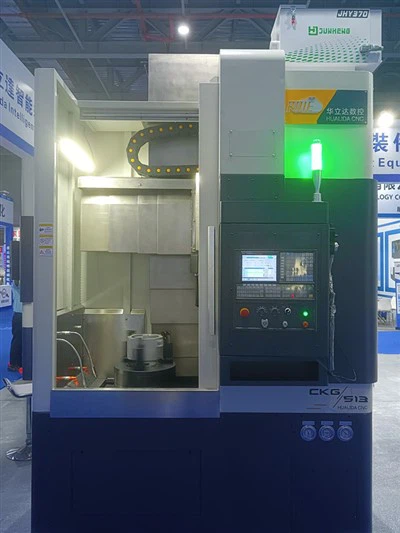
As a trusted supplier of CNC Vertical Grinding Machines, I understand the importance of maintaining these high - precision machines to ensure their optimal performance. One crucial component that may need replacement over time is the encoder. In this blog, I'll guide you through the process of replacing the encoder in a CNC vertical grinding machine.
Understanding the Encoder in a CNC Vertical Grinding Machine
Before we dive into the replacement process, it's essential to understand what an encoder is and its role in a CNC vertical grinding machine. An encoder is a device that converts motion into an electrical signal. In the context of a CNC vertical grinding machine, it provides feedback to the control system about the position, speed, and direction of the machine's axes. This feedback is crucial for accurate machining operations, as it allows the control system to make real - time adjustments to ensure the desired precision.
There are two main types of encoders used in CNC vertical grinding machines: incremental encoders and absolute encoders. Incremental encoders generate a series of pulses as the axis moves, and the control system counts these pulses to determine the position. Absolute encoders, on the other hand, provide a unique code for each position of the axis, allowing the control system to know the exact position without the need for a reference point.
Signs that the Encoder Needs Replacement
Several signs may indicate that the encoder in your CNC vertical grinding machine needs replacement. One of the most common signs is inaccurate positioning. If you notice that the machine is not achieving the desired precision in its movements, or if there are errors in the finished parts, it could be due to a faulty encoder. Another sign is abnormal noise or vibration during operation. A malfunctioning encoder can cause the machine to move erratically, leading to increased noise and vibration. Additionally, if the control system displays error messages related to the encoder, it's a clear indication that there is a problem.
Pre - replacement Preparations
Before you start the encoder replacement process, it's crucial to take several preparatory steps. First, ensure that the machine is powered off and unplugged to prevent any electrical accidents. Next, gather all the necessary tools, such as screwdrivers, wrenches, and a multimeter. You'll also need a replacement encoder that is compatible with your CNC vertical grinding machine. Refer to the machine's manual or consult with the manufacturer to ensure you get the right encoder.
It's also a good idea to take pictures of the encoder and its wiring before removing it. This will help you during the reinstallation process, especially when it comes to reconnecting the wires correctly. Additionally, clean the area around the encoder to remove any dirt, debris, or coolant that could interfere with the replacement process.
Removing the Old Encoder
Once you've completed the preparatory steps, you can start removing the old encoder. Begin by locating the encoder on the machine. In most CNC vertical grinding machines, the encoder is mounted on the motor or the lead screw of the axis. Use the appropriate tools to remove the screws or bolts that secure the encoder to the mounting surface.
After removing the mounting hardware, carefully disconnect the wiring from the encoder. Take note of the color - coding or the labeling of the wires to ensure correct reconnection later. If the encoder is connected to a connector, gently pull the connector apart. Be careful not to damage the wires or the connector during this process.
Once the wiring is disconnected, you can remove the encoder from the machine. Lift it out carefully, taking care not to drop it or damage any of its components.
Installing the New Encoder
Now that you've removed the old encoder, it's time to install the new one. Start by placing the new encoder in the same position as the old one. Make sure it is properly aligned with the mounting holes on the machine. Use the screws or bolts that you removed earlier to secure the encoder to the mounting surface. Tighten the hardware firmly, but be careful not to overtighten, as this could damage the encoder or the mounting surface.
Next, reconnect the wiring to the new encoder. Refer to the pictures you took earlier or the wiring diagram in the machine's manual to ensure correct connection. If the encoder has a connector, align the connector pins and gently push the connector together until it clicks into place.
Calibrating the Encoder
After installing the new encoder, it's crucial to calibrate it to ensure accurate operation. Calibration involves setting the encoder to the correct position and adjusting its parameters to match the machine's specifications. Consult the machine's manual for the specific calibration procedure for your CNC vertical grinding machine.
In general, the calibration process may involve moving the axis to a reference point and setting the encoder's zero position. You may also need to adjust the encoder's resolution or other parameters using the control system. Follow the instructions carefully to ensure that the encoder is calibrated correctly.
Testing the Machine
Once the encoder is installed and calibrated, it's time to test the machine. Power on the machine and run a test program to check the encoder's operation. Observe the machine's movements and monitor the control system for any error messages. Check the accuracy of the positioning by measuring the movement of the axis using a precision measuring tool.
If the machine operates smoothly and the positioning is accurate, then the encoder replacement was successful. However, if you notice any problems, such as inaccurate positioning, abnormal noise, or error messages, you may need to double - check the installation and calibration process.


Maintenance Tips After Encoder Replacement
After replacing the encoder, it's important to follow some maintenance tips to ensure its long - term performance. Regularly clean the encoder and its surrounding area to prevent the accumulation of dirt and debris. Check the wiring for any signs of damage or loose connections, and tighten any loose hardware if necessary.
Additionally, monitor the machine's performance closely for the first few days after the replacement. This will help you detect any potential issues early and take corrective action before they become major problems.
Related Products
If you're interested in exploring other types of CNC machine tools, we also offer Turning and Grinding Compound Machine Tools and High Precision Vertical Lathe. These machines are designed to meet the diverse needs of modern manufacturing and offer high - precision machining capabilities.
Contact for Purchase and Consultation
If you have any questions about replacing the encoder in your CNC vertical grinding machine, or if you're interested in purchasing a new CNC Vertical Grinding Machine, please don't hesitate to contact us. Our team of experts is ready to assist you with your needs and provide you with the best solutions for your manufacturing requirements.
References
- CNC Vertical Grinding Machine Operation Manual
- Encoder Manufacturer's Technical Documentation
- Industry Standards for CNC Machine Tool Maintenance