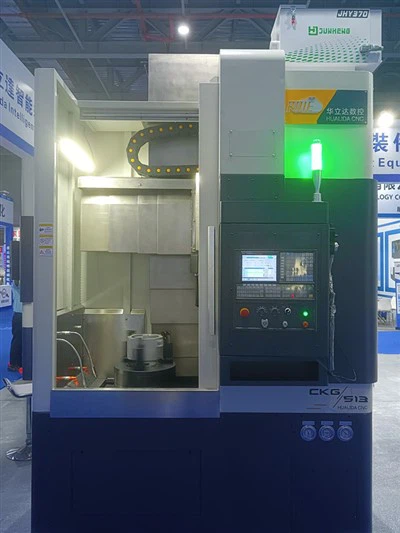
Hey there! As a supplier of the CKG513 CNC Vertical Lathe, I'm super stoked to take you on a tour of its control panel layout. It's like the nerve - center of this amazing machine, and understanding it can make your machining tasks a whole lot easier.
Let's start with the big picture. The control panel of the CKG513 CNC Vertical Lathe is designed with user - friendliness in mind. It's not one of those intimidating panels where you feel like you need a degree in rocket science just to turn it on.


At the top of the control panel, you'll find the main power switch. This is the first thing you interact with when you're about to start your machining operations. Flipping this switch is like giving the machine a wake - up call. Once it's on, the panel lights up, and you can start seeing all the different functions and options available.
Next to the power switch, there's a display screen. This screen is the window into the machine's brain. It shows you real - time information about the machining process, like the current position of the cutting tool, the speed of the spindle, and any error messages that might pop up. The display is clear and easy to read, even from a bit of a distance. It's a high - resolution screen, so you won't have any trouble making out the details.
Below the display screen, there's a keypad. This keypad is where you input all the commands and parameters for your machining jobs. You can use it to set the cutting speed, the feed rate, and the depth of cut. It's got a nice tactile feel, so you can type in your numbers and commands quickly and accurately. There are also some function keys on the keypad. These keys are shortcuts to some of the most commonly used functions, like setting the zero point, starting and stopping the spindle, and activating the coolant system.
On the right - hand side of the control panel, there's a jog control section. This is really handy when you need to move the cutting tool manually. You can use the jog control to move the tool in the X, Y, and Z axes. There are buttons for incremental movements, so you can move the tool in small, precise steps. This is great for setting up your workpiece and making sure everything is in the right position before you start the automatic machining process.
Then, there's a section for the spindle control. The spindle is the part of the machine that rotates the workpiece, so it's a crucial component. On the control panel, you can adjust the spindle speed. You can set it to a specific RPM (revolutions per minute) or use a variable speed control to adjust it as needed during the machining process. There are also buttons for starting and stopping the spindle, and for changing the direction of rotation.
Another important part of the control panel is the tool changer control. The CKG513 CNC Vertical Lathe is equipped with an automatic tool changer, which allows you to switch between different cutting tools quickly and easily. On the control panel, you can select the tool you want to use, and the machine will automatically change it for you. This saves a lot of time and makes the machining process more efficient.
In addition to all these basic functions, the control panel also has some advanced features. For example, there's a programming section where you can create and edit your own machining programs. This is useful if you have a complex machining job that requires a specific sequence of operations. You can write the program using G - code, which is a standard programming language for CNC machines.
Now, if you're into more advanced operations, the CKG513 CNC Vertical Lathe control panel also offers a simulation function. You can use this function to simulate your machining program before you actually run it on the machine. This helps you to detect any potential problems or errors in the program, and make the necessary adjustments. It's like having a virtual test run before you start cutting into your workpiece.
If you're looking for a more powerful and larger - scale CNC vertical lathe, you might be interested in our CKG518 CNC Vertical Turning Lathe or CKG518 CNC Vertical Lathe. These machines have similar control panel layouts but with some additional features and capabilities to handle bigger and more complex machining jobs.
The control panel layout of the CKG513 CNC Vertical Lathe is a well - thought - out design that combines functionality and ease of use. Whether you're a seasoned machinist or just starting out, you'll find that it's intuitive and easy to navigate. It gives you full control over the machining process, so you can produce high - quality parts with precision and efficiency.
If you're in the market for a reliable and high - performance CNC vertical lathe, our CKG513 CNC Lathe Machine is definitely worth considering. We've got a great team of experts who can help you with any questions you might have about the machine, its control panel, or the programming. And if you're ready to take the next step and make a purchase, we're here to assist you with the procurement process. Just reach out to us, and we'll start the conversation about how this amazing machine can fit into your manufacturing operations.
References
- "CNC Machining Handbook"
- Manufacturer's Manual for CKG513 CNC Vertical Lathe